


Linemate
4.697.00 Reviews
App Specs
- Version
- 2.1.2
- Updated On
- License
- Free
- Downloads
- 100,000+
- Developer
- Linemate Inc.
- Categories
- Sports
- Platform
- Android
Screenshots
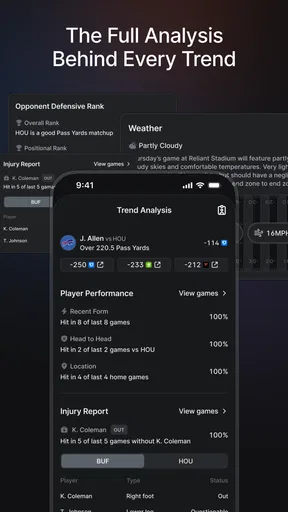
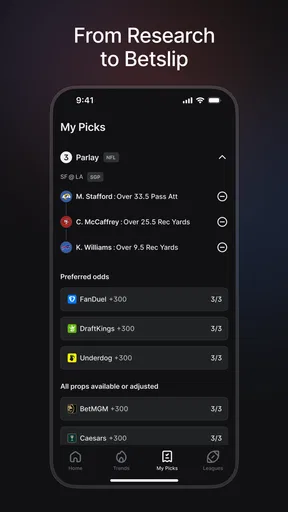
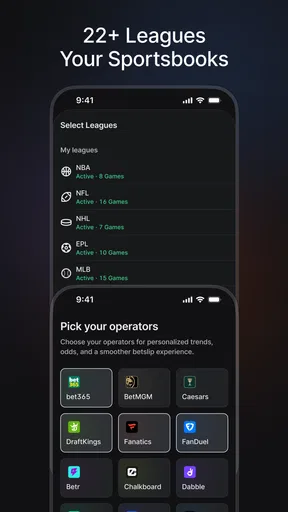
 Analysis by AppCompare
I’d judge Linemate by a different standard from a live-score app or a sportsbook: does it help me think through a betting decision before a game, rather than simply show me what is happening? That distinction matters. If I want research to sit alongside my normal sports routine, a dedicated tool can be useful; if I only want scores, schedules, or a place to place a bet, it may be more than I need.
Start with the kind of sports fan you are
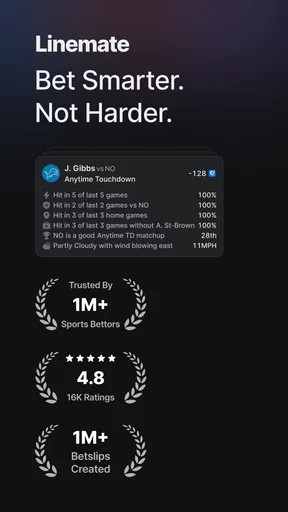
Linemate is a free sports app from Linemate Inc., built around researching bets for everyday fans. It is rated for Teen audiences, has a 4.6 average from around 2.1K ratings, and has passed 100K installs. Those figures suggest a substantial audience, but they don’t tell me whether its approach suits your habits. The practical question is whether you enjoy comparing a match and its context before making a decision, or whether you prefer to follow the action without betting analysis.
For a casual fan, research can be worthwhile even when the goal is simply to understand a matchup more clearly. I’d use a tool like this to organize my thinking, not to treat any suggestion as a sure thing. Betting outcomes remain uncertain, and a research platform can inform a choice without guaranteeing that choice will be right. That’s an important boundary to keep in mind before making the app part of a regular routine.
Where a dedicated research app can help
The clearest reason to try it is focus. General sports apps often center on scores, news, or team updates, while a sportsbook is primarily where a user places bets. Linemate occupies a different spot in that routine: it is intended for looking into betting decisions. I find that separation useful in principle because it encourages a pause between following a game and acting on a betting impulse.
A realistic use would be checking a matchup during a quiet moment before the event, deciding what questions matter to you, and then closing the app once you have enough context. That is more deliberate than switching rapidly between live updates and betting choices. I’d also keep personal notes outside the app if I wanted to see whether my reasoning was improving over time; a simple record of what I expected and why can reveal habits that a single result cannot.
Fit it into a measured routine
One practical tip is to decide in advance how much time you want to spend researching. Without a stopping point, comparing more information can feel productive while actually making a decision harder. I’d pick a small set of questions—what makes this matchup interesting, what could undermine my view, and whether I’m comfortable walking away—then stop when I’ve answered them. This workflow is useful for keeping analysis separate from the excitement of a live game.
Another trade-off is that research tools work best for people who are willing to question their first impression. If I open the app already convinced that my team will win, I may only look for support for that belief. I’d deliberately look for reasons my initial view could be wrong. That habit is more valuable than treating any app as an authority, and it helps keep betting research from turning into confirmation-seeking.
Worth Reading Before You Choose

Flipboard Shows What News Apps Must Do Beyond the Feed

Switching to Android Auto Means Rethinking Your Driving Routine

Google Calendar Makes a Crowded Week Easier to Manage

Ludo King Makes the Most of the Minutes Between Plans

Baby Panda World Brings Quick Play to Modern Phones, but Its Game Library Feels Busy

ESPN’s Live Game View Makes Following Close Games Easier
Getting Started with Linemate
The first thing I noticed about Linemate is its sleek, intuitive interface. When you open it up, you're greeted with a clean workspace that invites creativity. It's like having a blank canvas ready for your masterpiece. The setup is straightforward; you can jump right into drawing without any complicated tutorials or settings to fiddle with. For those who want a little guidance, there are handy tips sprinkled throughout, but nothing that gets in the way of diving in headfirst.
Features That Stand Out
Now, let’s talk features because that’s where Linemate really shines. This app is packed with tools that cater to both beginners and seasoned artists. You’ve got everything from basic brushes to advanced layers, allowing you to create art that’s as simple or as complex as you want.
- Brush Variety: The app boasts a wide range of brush styles, from pens and pencils to watercolor and airbrush effects. It's like having an artist's toolkit right at your fingertips.
- Layer Management: Layers are a lifesaver, especially when you’re working on detailed pieces. Linemate makes it easy to add, remove, and manage layers, giving you full control over your creation.
- Color Palettes: You can create and save custom color palettes, which is awesome for keeping your artwork consistent and vibrant.
- Zoom and Pan: The zoom and pan functionality is smooth and responsive, letting you get up close and personal with your work.
Creating and Sharing Your Art
Once you’ve created your masterpiece, Linemate makes it super easy to share your art with the world. You can export your work in various formats, which is perfect if you're planning to print it or share it on social media. There's also an option to save your projects to the cloud, so you can access them from any device. It’s like having a portable art studio wherever you go.
Performance and User Experience
Performance-wise, the app runs smoothly without any annoying lags or crashes, which is crucial when you're in the zone and don't want any disruptions. It’s compatible with both Android and iOS, and I found it to work seamlessly across different devices. The user experience is top-notch; everything feels intuitive and well thought out, making the creative process enjoyable and stress-free.
Why You Should Give Linemate a Try
If you're someone who’s into digital art or just looking for a way to unwind by drawing, Linemate is definitely worth checking out. It combines powerful tools with an easy-to-use interface, making it suitable for artists at any level. Whether you’re sketching out ideas or crafting detailed pieces, this app offers versatility and flexibility.
In conclusion, Linemate is a fantastic app that bridges the gap between simplicity and functionality. It provides all the necessary tools to let your creativity flow, and its user-friendly design ensures that nothing holds you back. So, go ahead and give it a whirl; you might just find it becomes your go-to app for all your artistic endeavors.
Choosing between research, scores, and betting
The most useful comparison is not a feature checklist against every other sports app; it is a comparison of jobs. A live-score app is the better choice when I want quick updates without analyzing a wager. A news or statistics-focused sports app may suit someone who wants broad coverage and team stories. A sportsbook is the direct option for placing a bet. Linemate is for the step before that: considering a betting angle. These categories can complement one another, but they are not interchangeable.
If your interest is mainly a favorite team, you may get more enjoyment from ordinary coverage and discussion than from betting research. Likewise, if you want a tool that tells you exactly what to choose, this is not the mindset I’d bring to any research app. I’d skip it if betting itself is not part of your interests, or if opening betting-related content tends to make it harder for you to stick to personal limits. A score tracker or general sports news source is a better fit in those situations.
What to expect before making it a habit
The app is free to download, with in-app purchases listed from $9.99 to $79.99 per item. I’d start by exploring the free experience and decide whether the research workflow genuinely adds value before considering any purchase. The range is broad enough that I would check the price and terms for a specific item in the app rather than assume every option costs the same. There is no need to pay simply because a tool is related to betting; the value depends on whether it helps you make more thoughtful decisions.
For someone switching from a general sports app, the main cost is not learning a complicated system so much as changing the order of their routine: research first, then decide whether to act. I’d try it on a game I already follow, while keeping my usual score source for live updates. That small trial makes it easier to tell whether the research format is genuinely useful or just adds another screen to check.
The current version is 1.26.3, and the app was released on October 12, 2022. It requires Android 7.0 or later. If you use an iPhone or iPad, check the app’s availability and compatibility in the relevant store before planning around it; compatibility can vary by device and operating-system version. These practical checks matter more than assuming that a sports app will behave identically across every phone.
Who should try it—and who should pass
I’d recommend giving it a look if you already follow sports closely, want a more deliberate way to research betting decisions, and are comfortable treating analysis as input rather than certainty. It may be particularly useful for a fan who tends to make quick choices while watching a game and wants to move that thinking to a calmer moment beforehand. Setting a personal time or spending limit before opening any betting-related app is a sensible part of that routine.
I’d pass if all you need is a fixture list, a score notification, or general sports headlines. I’d also choose a broader sports information app if your main interest is following several leagues without a betting focus. For anyone who does try Linemate, my advice is to use it with a clear question in mind, look for reasons your first take might be mistaken, and be willing to make no bet at all. That is the point at which research becomes a useful habit rather than pressure to act.
My recommendation
Linemate has a specific role: it is a sports research option for fans who want to think about betting decisions, not a replacement for every score, news, or wagering app. I like the idea of separating research from the rush of a live event, and the free starting point makes it reasonable to see whether that approach fits your routine. The in-app purchase range is worth checking carefully if you move beyond the free experience, and no analysis should be mistaken for a promise of a result.
If you are curious about betting research and can use it thoughtfully, I’d try it with one familiar matchup and judge whether it leaves you better informed without making you feel compelled to bet. If your needs are simpler—or if betting content is not a healthy fit for you—stick with a score or news app instead. That is a more useful decision than expecting one sports app to serve every kind of fan.
Pros
- User-friendly interface for easy navigation.
- Offers real-time collaboration features.
- Compatible with both Android and iOS.
- Customizable notifications for updates.
- Secure data encryption and privacy settings.
Cons
- Limited offline functionality available.
- Some features require in-app purchases.
- Occasional syncing issues reported.
- Limited integrations with other apps.
- User support can be slow to respond.
FAQs for Linemate
What is Linemate and what does it offer?
Linemate is a productivity app designed to help users organize their daily tasks, set reminders, and track their progress efficiently. It offers a user-friendly interface with customizable features such as color-coding and priority settings, making it ideal for both personal and professional use. It integrates seamlessly with calendars and other productivity tools.
Is Linemate available on both Android and iOS platforms?
Yes, Linemate is available for download on both Android and iOS platforms. The app is designed to provide a consistent experience across devices, ensuring that users can access their tasks and reminders whether they're on a smartphone or tablet. Regular updates are provided to enhance functionality and user experience.
Does Linemate require an internet connection to function?
Linemate can be used both online and offline. While an internet connection is required to sync data across devices, users can still access and manage their tasks without connectivity. Any changes made offline will automatically sync once an internet connection is restored, ensuring seamless usability.
Are there any in-app purchases or subscription fees?
Linemate offers a free version with basic features. However, there are in-app purchases and subscription options for advanced features such as cloud storage, premium themes, and enhanced collaboration tools. Users can choose a plan that best suits their needs, with flexible monthly or annual payment options.
How does Linemate ensure the security of my data?
Linemate prioritizes user data security by implementing robust encryption protocols and regular security updates. Data is stored securely on cloud servers, and users can enable two-factor authentication for added protection. The app complies with industry standards for data privacy, ensuring that your information remains confidential and secure.


